During a performance investigation on an e-commerce application I worked on, I found a hidden cost in the image request path: some product images were processed by the same Next.js application servers handling page traffic.
I moved image delivery to Amazon S3 + CloudFront. In our workload, EC2 CPU usage fell 75%, while image TTFB improved from about 1.2 seconds to under 50 ms.
The request path was the clue#
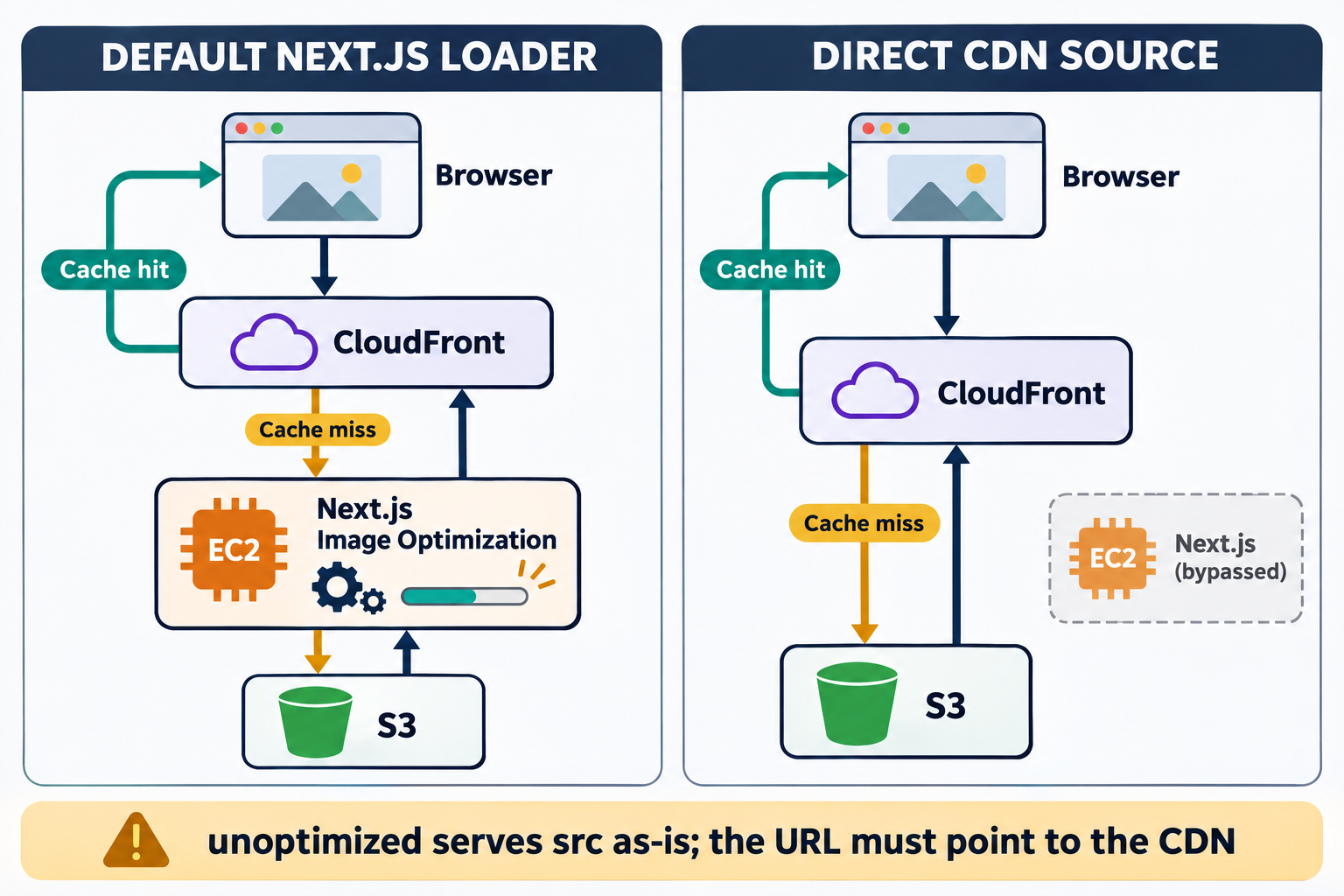
With the default Next.js Image loader, the browser requests /_next/image. On a cache miss for a new width or quality variant, the Next.js server may need to fetch, resize, and encode the image. CloudFront can cache the finished response, but it cannot skip that first origin computation.
In our setup, I changed the path for prepared product images:
- ▸Before: Browser → CloudFront → Next.js optimizer on EC2 → source image
- ▸After: Browser → CloudFront → image in S3
Serving the prepared asset directly removed image processing from the application server’s critical path.
unoptimized is about the source URL#
The unoptimized prop tells Next.js to serve the supplied src as-is. It does not route the request through CloudFront, resize the file, or compress it. The src must already point to a CDN URL that returns an appropriately sized, optimized image.
That makes unoptimized a good fit for pre-sized CDN assets. If Next.js is the only layer producing responsive variants, keep its optimizer and let CloudFront cache the output. A CDN in front of Next.js does not make the optimizer redundant by itself.
The production risk: image spikes can slow the whole app#
Image resizing and encoding use CPU and memory. If that work shares EC2 capacity with SSR, React Server Components, or API routes, a burst of uncached variants can compete with page rendering. The symptom may be a slow storefront during a campaign, even though the application code did not change.
For workloads that still need on-demand transforms, a useful option is to isolate GET /_next/image behind a separately scalable optimizer. That lets image capacity grow independently from the frontend tier. The Platformatic article on scaling Next.js image optimization describes one implementation of this pattern. I’m sharing it as an architectural option; it is not the setup I’m claiming we deployed.
A few production guardrails make that path safer:
- ▸Allow only approved image sources and valid width/quality values.
- ▸Bound processing time and retries; deduplicate simultaneous requests for the same variant.
- ▸Track CDN cache hits, origin requests, optimizer CPU/memory, p95/p99 latency, errors, and queue depth if applicable.
- ▸Define a user-friendly fallback for failed image processing.
What I’d measure before choosing#
- ▸Is the browser loading
/_next/imageor a direct CDN URL? - ▸What happens on a cold cache and during a campaign-like traffic burst?
- ▸Do image bytes, dimensions, format, TTFB, and LCP improve together?
- ▸Does EC2 capacity actually scale down, or does the CPU reduction provide more headroom?
- ▸What are the added CloudFront, S3, and transformation costs?
A 75% CPU reduction is not automatically a 75% bill reduction. If instance size and count stay the same, the compute charge may stay the same too.
The takeaway#
The result I measured—75% lower EC2 CPU and image TTFB under 50 ms—came from moving prepared image delivery to S3 + CloudFront. The broader lesson: trace the cache-miss path before changing unoptimized. Serve prepared renditions directly; keep or isolate dynamic optimization when it is doing valuable work.
These numbers are from our workload, not a universal benchmark. I’d validate cold-cache behavior, user experience, and total cost before applying the same design to another store.